
PeakAI
One agent, from your first invoice to your next estimate.
PeakAI is the AI agent inside Everpeak Estimating. It turns your own project history into an estimating assistant that gets smarter with every project you load. PeakAI proposes and a person decides. Each part of this page is marked as working today or in development.
What did we pay on average for a 2x4x10 last year, and across how many invoices?
You paid $6.13 each on average, across 14 invoices from three vendors.
| Vendor | Invoices | Average |
|---|---|---|
| Sample Lumber Co. 1 | 8 | $6.00 |
| Example Building Supply 2 | 4 | $6.20 |
| Demo Timber Ltd. 3 | 2 | $6.50 |
Worked out from the lines sorted to Framing lumber, 2x4 1 2 3
- Working today
- Sorting cost lines into your cost history
- Review of every uncertain line by a person
- Questions answered from your own projects
- In development
- Takeoff from drawings and schedules
- Questions on scope an estimate may have missed
- What PeakAI knows
- Team memory: tell PeakAI something once
What it does
PeakAI proposes. You accept or reject each line.
It reads what you send, answers from your own projects, and gets sharper with every project you add. Nothing it proposes enters your cost history or an estimate until a person accepts it.
Your cost history · Working today
Your invoices and estimates, turned into a structured cost history.
PeakAI reads every document and sorts each cost line into one consistent structure.
- A vendor's wording is sorted once, then remembered.
- Anything it is unsure of is held for a person.
- A person accepts, corrects or rejects each held line.
| Line as written | Sorted to | Confidence |
|---|---|---|
| SPF 2X4 10' KD240 each · $6.00 | Rough carpentryFraming lumber, 2x4 | HighRemembered from invoice 0987 |
| JOIST HGR LUS21096 each · $2.15 | Rough carpentryJoist hanger | HighRemembered from invoice 0987 |
| DELIVERY CHG1 · $185.00 | Site costsDelivery | MediumNew wording. Held for a person. AcceptCorrectReject |
| MISC HARDWARE1 · $96.40 | Not sorted yet | LowToo vague to place. Held for a person. Choose a categoryReject |
Ask your history · Working today
Ask…
Your estimating history, answering in plain English.
PeakAI answers from every document and estimate loaded into your account. Every answer comes from your own projects, and shows where each figure came from.
- Totals, averages and prices at the year you pick.
What did framing cost us per square metre on our last three multi-family projects, at today's prices?
At 2026/27 prices, framing ran from $574 to $655 per m² of floor area. Your median is $612.
| Project | Built | Framing | Per m² |
|---|---|---|---|
| SYN-203 Alder Court 1 | 2022/23 | $2,204,160 | $574 |
| SYN-207 Linden Terrace 2 | 2023/24 | $2,570,400 | $612 |
| SYN-211 Spruce Landing 3 | 2024/25 | $3,013,000 | $655 |
Worked out from the Cost data of each project 1 2 3
General practice, not from your data: a spread like this is usual. Taller storeys and more steel in the framing tend to put a project at the top of the range.
HelpfulNot right
Takeoff · In development
Get priced line items straight from your schedules.
Give PeakAI your architectural drawings and schedules. It reads each schedule, matches it to the drawings and proposes quantities for you to approve, for more accurate takeoff and better estimates.
- Each schedule read into a table beside its drawing.
- Quantities counted from the rows you approve.
- You accept or reject each priced line.
Sheet A-601 · the picked row is outlined
| No. | Room | Width | Type | FRR | Review |
|---|---|---|---|---|---|
| 101 | Vestibule | 915 | A | 45 MIN | Approved |
| 102 | Office | 915 | A | 45 MIN | Approved |
| 103 | Loading bay | 1830 | B | Approved | |
| 104 | Electrical room | 915 | A | 45 MIN | To check |
| 105 | Staff room | 915 | C | 20 MIN | Approved |
14 rows read · 11 approved · 3 to check
Missed scope · In development
PeakAI flags scope your past projects carried that this estimate does not.
As you build an estimate, PeakAI lists what your past projects carried that this one does not. Each question is yours to answer, and the answer is saved with the estimate.
- Add a line, mark it covered, or mark it not applicable.
- Every question names the past projects it came from.
| Question | Your answer |
|---|---|
| Site conditionWithin 50 m of a watercourse. None of the comparables were. Is dewatering priced? | Add a lineCoveredNot applicable |
| BasementFull basement. Two of the three comparables were slab on grade. Are excavation and waterproofing priced? | CoveredAnswered by the estimator. Saved with the estimate. |
| HeightFour storeys. The comparables were three. Are the added scaffolding and hoisting priced? | Add a lineCoveredNot applicable |
Team memory · In development
Tell it something once and it remembers, for your whole team.
Remember that we carry framing per square metre of floor area.
Noted: framing is carried per m² of floor area. Shared with your team under What PeakAI knows.
What PeakAI knows · In development
A map of everything PeakAI knows about your work
Everything PeakAI holds about your work has a place on one map. Each point is one thing it knows: a fact from your records, something you asked it to remember, or a finding it worked out from your projects. Open any point to read it and see where it came from.
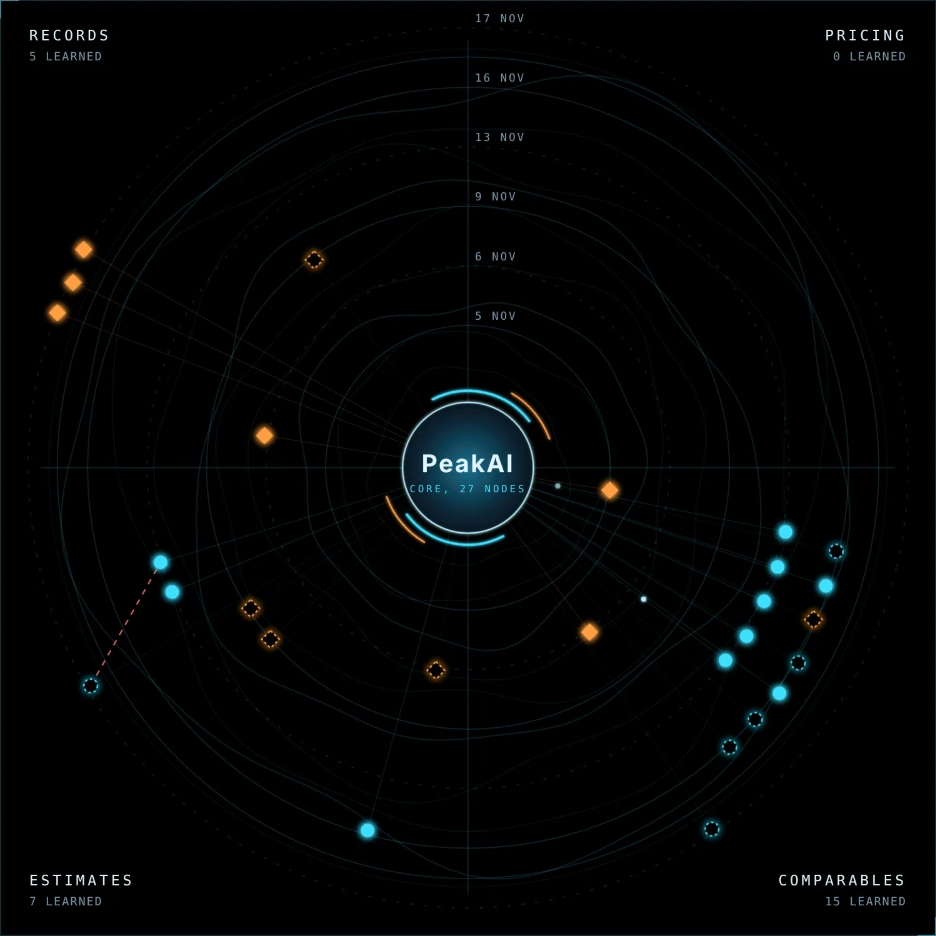
In this example
- Lines held
- 27
- Kept and in use
- 16
- Waiting, not in use
- 11
- Of which findings worked out
- 9
Facts, notes and findings
What your records show, what you have told PeakAI, and what it has worked out from your projects.
Four areas, by date
Records, pricing, estimates and comparables. Each ring is a date, so you can see what PeakAI learned and when.
Kept, or waiting
A line shapes PeakAI's answers only once it is kept. Until then it waits, and is not used.
In development
Where PeakAI is going
PeakAI is being built to work as a project manager that keeps learning. As more projects are loaded, it learns why overruns happen and how they were handled, where change orders and scope creep come from, and the lessons each project leaves behind. It carries that experience, never another client's data, into the next project.
Our goal: every project in BC lands on its budget.
Your data
Your projects stay yours.
Your estimates only
Your projects build your estimates and nothing else.
Context stays private
Site conditions, access constraints and bid outcomes stay in your account only.
Hosted in Canada
Your data is held in a secure cloud environment in Canada.
See PeakAI on a sample estimate.
A 30-minute walkthrough using synthetic sample data: your questions, PeakAI's answers, and the source behind each figure.